Arabic Notebook Right to Left Paper KDP
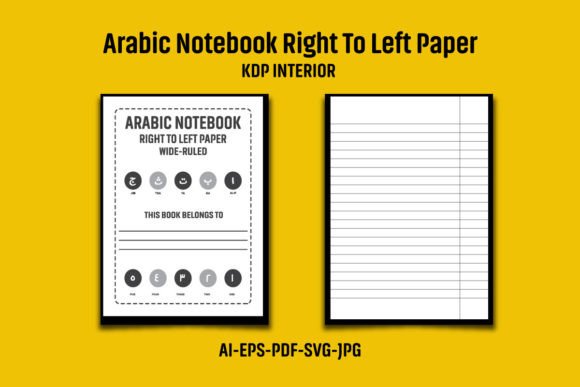
When you publish notebooks on Amazon KDP, the formatting must match the needs of your audience. For Arabic writers, students, or anyone who reads and writes from right to left, a standard left-to-right notebook feels wrong. The Arabic Notebook Right to Left Paper KDP is a pre-formatted interior designed specifically for right-to-left scripts. It includes files in AI, EPS, PDF, JPG, and SVG formats, all sized at 8.5″x11″ with bleed (8.62 x 11.25 inches overall) and 120 pages at 300 DPI. This interior is meant to be a foundation for creating your own unique notebook on KDP.
Different people approach this interior with different priorities. A publisher launching a series of Arabic notebooks cares about speed and consistency. An educator creating a classroom resource cares about layout clarity and cost. A beginner exploring KDP for the first time cares about ease of use and avoiding duplicate content flags. Understanding how this interior serves each of these needs helps you decide whether it fits your own project.
What Makes This Interior Distinct
This is not a ready-to-upload file. It is a flexible template that you must customize. The package gives you vector files (AI, EPS, SVG) that let you change colors, add your own logo, and adjust design elements. The PDF and JPG files offer a quick preview or a printable version, but the real value lies in the editable formats. Because the paper is designed for right-to-left writing, the binding edge, page order, and margins all support Arabic script naturally. You are not fighting the format to make it work.
The black and white interior is set at 300 DPI, which meets KDP’s print requirements. The 120-page count is a popular size for notebooks—short enough to keep costs low, long enough to feel substantial. The bleed setting (8.62 x 11.25 inches) ensures that any edge-to-edge design elements will print correctly without white borders.
Why Different Audiences Care About This Interior
If you are a KDP beginner, your main worry is probably technical. You do not want to spend hours learning software just to create one product. This interior gives you structured files that open in Illustrator, Inkscape, or any vector editor. You can change the cover design, add your brand, and export a clean PDF for upload. The risk of duplicate content is real on KDP, which is why the instructions clearly state that you must add your own logo or graphic to the interior pages. Following that step protects your listing and builds your brand.
For an experienced publisher, the priority is different. You might be launching multiple Arabic notebooks under different niches. The ability to quickly edit the AI or EPS file, swap out design elements, and batch-produce variations saves hours. You already know that KDP’s system flags identical interiors, so you appreciate the reminder to customize each version. The 300 DPI resolution and proper bleed also matter to you because returns due to print quality hurt your account health.
Creators and designers often look for flexibility. The SVG file is especially useful if you want to incorporate the notebook layout into a web preview, a mockup generator, or an interactive tool. You might not even sell the notebook itself—you could use the interior as a base for a digital product, a course resource, or a client deliverable. The vector formats allow unlimited scaling and editing, so you are not stuck with a fixed design.
Educators and tutors who teach Arabic to children or adults may want to create themed notebooks for their students. You can replace the plain pages with lined paper, grid paper, or add prompts. The 120-page count is manageable for a semester, and the right-to-left flow helps learners develop the correct writing orientation. You are not just selling a product; you are supporting a learning process. The ability to change colors (while staying black and white for affordability) means you can match a school’s branding or a classroom theme.
Small business owners and freelancers might offer custom notebooks to clients. If a customer asks for an Arabic journal, prayer notebook, or planner, this interior gives you a reliable starting point. You can add their logo, adjust the layout, and deliver a professional PDF in a short time. The commercial value comes from the hours you save not building the layout from scratch.
Practical Examples by Use Case
Let us say you are a hobbyist who wants to design a personal gratitude journal in Arabic. You download the ZIP file, extract the AI file, and open it in a free tool like Inkscape. You change the cover to your name, adjust the page color to a soft cream, and export as PDF. You upload it to KDP, order a proof, and the notebook prints correctly because the bleed and margins are already set. You do not need to learn advanced layout design.
Now consider a marketer creating a branded notebook for a community event. You want the interior to reflect the organization’s visual identity. You open the EPS file, import your color palette, and modify the page numbering style. The vector layer structure lets you keep the right-to-left settings intact while making your edits. The final product is a notebook that looks custom-made, even though you started from a template.
A blogger or content creator who reviews Arabic learning tools might use this interior to produce a free downloadable sample. You give your audience a 10-page preview from the PDF, showing how a proper right-to-left notebook should look. This builds trust and positions you as someone who understands the nuances of Arabic publishing.
Evaluating Quality, Cost, and Long-Term Usefulness
Quality is not just about resolution. It is about whether the interior behaves correctly when uploaded to KDP. The 300 DPI and proper bleed reduce the risk of rejection at upload. The vector formats mean you can adjust the design for different trim sizes or paper types later if you expand your product line. The black and white interior keeps printing costs low, which is important if you want to price your notebook competitively on KDP.
Cost is straightforward. You are paying for the template structure, not the content. You can use it for multiple projects as long as you customize each one. Compared to hiring a designer to build a right-to-left layout from scratch, the template saves both money and time. The real cost to consider is the effort you invest in editing the files—if you are unfamiliar with vector software, you may need a few hours to learn the basics.
Long-term usefulness depends on how you intend to scale. If you plan to publish one or two notebooks, this interior is probably sufficient. If you want to create a series of 50 Arabic notebooks with different themes, the AI and EPS files become repetitive to edit one by one. In that case, you might eventually move to a more automated workflow or invest in a script that customizes the interior programmatically. But for most users, the template offers a solid foundation for many projects.
Identifying Whether This Interior Matches Your Goals
Ask yourself a few questions:
- Do I need a right-to-left layout for Arabic, Urdu, Farsi, or similar scripts? If yes, this interior saves you from manually setting margins and page direction.
- Do I have access to vector editing software (Illustrator, Inkscape, Affinity Designer)? If not, the PDF may be your only usable file, which limits customization.
- Am I willing to add my own logo or design to each page before uploading? This is essential to avoid duplicate content flags. If you skip this, your listing may be suppressed.
- Does 120 pages suit my target audience? Some buyers prefer thinner notebooks (60–80 pages) for portability, while others want thicker options (200+ pages). The interior works best for those who find 120 pages appropriate.
- Is black and white acceptable for my niche? For journals, prayer notebooks, or school workbooks, black and white is standard. If you need color, you will need to modify the files.
If you answered yes to most of these, the interior is a practical match. If you need a different page count or a color interior, you might need to adapt the files or look for a different template.
Flexibility and Presentation Considerations
One of the less obvious features of this interior is that it comes in multiple file formats. The AI and EPS files are CS6 versions, which means they open in older and newer versions of Illustrator alike. The JPG files give you a quick visual reference. The SVG file allows you to embed the layout in a website or use it with web-based design tools. This variety matters if you work across different platforms or collaborate with others who use different software.
Presentation on KDP also depends on how you handle the cover and description. The interior alone does not guarantee sales. You still need a compelling cover, a clear product title, and a description that explains why a right-to-left notebook matters. Mentioning the script direction, page count, and size helps customers immediately understand the product.
For the professional publisher, the speed of turning this interior into a live product is a real advantage. You can edit the AI file, generate a cover in the same software, and upload everything within a few hours. The reliability of the pre-set margins and bleed reduces the chance of errors that cause returns or negative reviews.
Common Questions When Using This Interior
People often wonder whether they should use the PDF directly or edit the AI file. The PDF is a flattened version—useful for previewing, but not for editing. The AI and EPS files contain layers that let you change text, colors, and page elements. Always edit the vector files if you want full control.
Another concern is whether the ZIP file extraction requires special tools. The instructions recommend Win ZIP or WinRAR, but modern operating systems can extract ZIP files natively. If you are on a Mac, double-clicking the ZIP file usually works. The files inside are organized clearly, so you do not waste time searching.
Some beginners worry about the duplicate content warning mentioned in the description. This is a standard precaution from the seller. KDP does allow template-based products as long as each upload has unique content. Adding your logo, changing the design, or even adjusting the cover and sample pages is usually enough to differentiate your product. Do not skip this step.
Final Thoughts on Choosing the Right Template
The Arabic Notebook Right to Left Paper KDP interior is a practical tool for anyone who wants to publish an Arabic notebook without learning book layout from scratch. It respects the writing direction of the script, meets KDP’s technical requirements, and gives you room to personalize. Whether you are a beginner testing the KDP waters, an educator supporting language learners, or a small business owner fulfilling client orders, this interior can match your pace and quality expectations.
The key is to treat it as a starting point. Customize it, brand it, and make it your own. That is where the real value lies—not in the template itself, but in what you build with it.