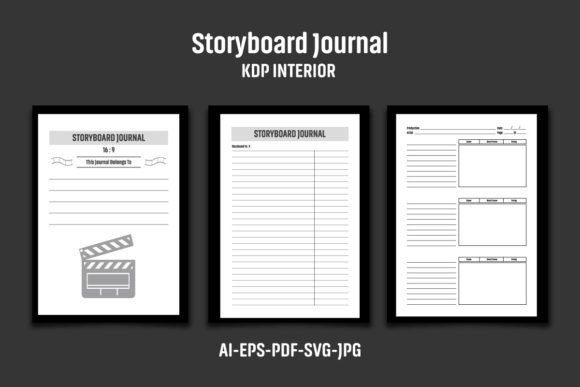
Storyboard Journal KDP Interior
A blank storyboard is more than just empty frames—it’s the starting point for every great visual narrative, campaign, or animation sequence. Yet, the structure holding those frames together determines whether your workflow feels fluid or frustrating. For designers building their Amazon KDP publishing business, a polished Storyboard Journal KDP Interior is the difference between a professional asset and an amateur layout. This specific interior delivers exactly what a modern creative workflow demands: flexibility, resolution, and cross-platform compatibility.
What Makes This Interior a Standout Creative Asset
The package arrives as a compressed ZIP file containing an AI file (CS6 version), an EPS file, a PDF file, three JPG files, and an SVG file. With an 8.5″ x 11″ trim size (8.62 x 11.25 inch overall dimensions with bleed) and 120 pages of high-resolution content at 300 DPI, this interior is engineered for both print and digital manipulation. The black-and-white configuration makes it easy to change colors, adapt branding, or overlay your own graphic elements. In the world of visual design, consistency is king, and a well-structured storyboard journal interior supports this by offering a ready-made grid system that guides the eye naturally from shot to shot, note to note.
How It Elevates Your Graphic Design Workflow
Typography, composition, and color palette choices all hinge on the underlying structure of your canvas. When the canvas is pre-optimized for professional presentation, you save hours of setup time and reduce the risk of formatting errors. The inclusion of both an editable AI file (Illustrator CS6) and an SVG file guarantees that designers across different software ecosystems—from Adobe Creative Cloud to free vector editors—can open, customize, and export their storyboards without friction. The 300 DPI resolution ensures crisp output whether the final destination is a printed paperback book or a high-definition digital presentation.
Practical Applications Across the Design Landscape
How can you integrate this type of interior into your creative projects? The applications span nearly every corner of the design industry:
- Branding and Logo Design: Map out visual identity systems and brand guidelines before committing to final vectors.
- Marketing Materials: Plan campaign flows, email sequences, and landing page architectures.
- Social Media Content: Storyboard video ads, carousels, and Reels for cohesive digital marketing execution.
- Website and UI/UX Design: Wireframe user journeys, page transitions, and responsive layouts.
- Editorial Layouts: Sequence magazine spreads, photo essays, and long-form print design projects.
- Packaging Design: Visualize unboxing experiences, structural folds, and product variations.
- Advertising Campaigns: Outline commercial scripts, animatics, and print ad sequences.
- Presentations: Build cohesive narratives and pitch decks that maintain strong visual hierarchy.
- Merchandise and Digital Products: Plan style guides, pattern variations, and product catalogs.
Actionable Tips for Selecting and Using Design Assets
When evaluating creative assets like this KDP interior, look beyond the file format. Scalability is crucial—verify that the vector components in the AI and EPS files can be expanded infinitely without quality loss. Readability matters: check that line weights and frame proportions align with standard aspect ratios used in film and digital media. Consistency with your existing brand systems is non-negotiable. A well-chosen template should adapt to your brand’s typography and color palette, not force you to redesign your identity around it.
Because the interior is strictly black and white, you retain full control over the color palette. This makes it an ideal foundation for complex branding projects where precise spot colors or gradients are required later in the workflow. The modern aesthetics of a clean, grid-based layout also support better user engagement by providing familiar visual cues that audiences instinctively understand.
Important Practical Advice for KDP Publishers
It’s critical to note that the file structures provided are the skeleton of your project. To maintain originality and avoid duplicate content flags on platforms like Amazon KDP, you must add your own logo, unique graphics, and proprietary branding to the interior pages before publishing. The images, mockups, and sample texts in the preview are for presentation purposes only. Treat this interior as a high-quality blank slate—your creative input transforms it into a unique product that reinforces your design authority and builds a stronger brand identity.
Ultimately, the tools you choose directly influence the quality of your communication. A thoughtfully designed storyboard journal interior does more than organize frames—it elevates the entire creative workflow, from initial concept to final execution. Whether you are crafting a brand identity, designing a user interface, or building a passive income stream on KDP, starting with a structurally sound, high-resolution asset ensures that your energy goes toward creativity rather than troubleshooting grid lines. In a competitive market where professional presentation sets the tone, these interior files offer the reliable foundation every designer deserves.