Weekly Task List Printable Template Guide
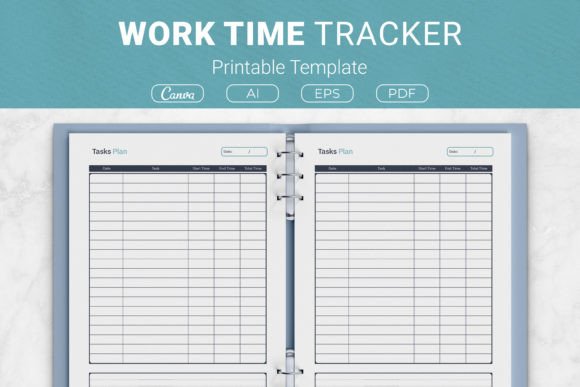
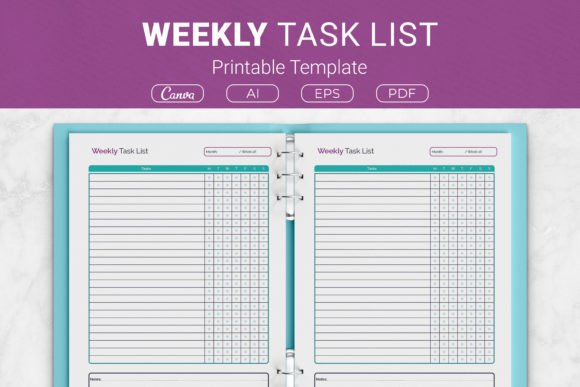
A weekly task list printable template does exactly what the name suggests—it gives you a structured, ready-to-use layout for capturing everything you need to accomplish over seven days. The version described here includes AI Illustrator files, EPS, PDF files ready for print, and a Canva template link, so you can edit, resize, or print it in multiple formats. Sizes range from US Letter and A4 down to 6 by 9 inches, making it suitable for binders, planners, or KDP interiors. The layout itself is straightforward: space for tasks, priority markers, and a notes section for deadlines or reminders.
What seems simple on the surface can actually shift how you approach your week. Instead of keeping to-dos in your head or scattered across sticky notes, you have one central place to review and adjust. That clarity matters whether you are managing a single project or juggling multiple responsibilities.
Why a Simple Weekly Layout Serves So Many People
A weekly task list works because it matches the natural rhythm of most people's lives. Work, errands, appointments, and personal goals often repeat or shift within a seven-day cycle. Having a dedicated template removes the need to redesign your planning system each week. You fill in the blanks, prioritize, and move on.
Different audiences value different aspects of this kind of template. A beginner may appreciate that the layout is clean and uncluttered—no learning curve, just write and go. An experienced planner user might value the ability to customize the template in Illustrator or Canva, adjusting columns, fonts, or spacing to fit a specific system. A freelancer or entrepreneur could use the priority section to separate urgent client work from longer-term business development tasks. An educator might print a batch for lesson planning and student check-ins. A hobbyist could track practice sessions, project milestones, or reading goals.
The point is not that the template does something revolutionary. It is that the structure reduces friction. You spend less time setting up your planning tool and more time actually planning and doing.
Ease of Use for Beginners and Busy Professionals
If you have tried digital task managers and found them overwhelming, a printable template offers a tactile, low-distraction alternative. There is no app to learn, no sync issues, no notification pings. You print the page, grab a pen, and start listing. For a busy professional who already stares at screens all day, writing tasks by hand can feel more deliberate and calming.
The template comes in PDF format ready to print, which means you do not need any special software to get started. If you want to make small tweaks—like changing the heading font or adding a checkbox column—the Canva template link gives you that flexibility without requiring design experience. That combination of ready-to-use and easy-to-edit makes it accessible whether you are a complete beginner or someone who has tried a dozen planning systems.
Flexibility for Creators and Small Business Owners
Creators managing content calendars, client projects, or product launches often need to see their week at a glance. The notes section in this template allows you to attach context to each task—due times, file links, or follow-up steps. You can print one copy for your desk and keep a digital version in Canva for quick edits.
Small business owners might use the template differently. One owner could print it weekly and assign it to team members during Monday huddles. Another might use it as a personal behind-the-scenes planner to track inventory checks, social media posts, and bookkeeping deadlines. The multiple sizes matter here: the 7.5 by 9.25 inch version fits standard ring binders, while the 6 by 9 inch size works well for pocket planners. Having those options means the template can integrate into existing organizational systems without forcing a new format.
Commercial Value for Publishers and Print Sellers
For those involved in Kindle Direct Publishing or selling digital products, this template is designed with commercial use in mind. The included AI, EPS, and PDF files give you the source assets needed to create a professional planner interior. You can adjust colors, add branding, or combine multiple pages into a full planner book. The multiple size options also mean you can offer the same template in different product formats—US Letter for US-focused Amazon listings, A4 for international markets, and smaller sizes for compact planners.
If you are selling on Etsy or Gumroad, you can use the Canva template to create mockups or listing images quickly. The fact that the files are open source (AI format) means you are not locked into any single software ecosystem. That flexibility matters when you want to repurpose the same template for different products or audiences.
The Beginner Who Wants Structure Without Complexity
Imagine someone who has never used a planner consistently. They buy a template pack, print a few copies on standard Letter paper, and start each Sunday evening by listing the week's main tasks. The simple layout does not demand categorization or color-coding. They just write down errands, work deadlines, and one personal goal. Within two weeks, they notice fewer forgotten appointments and less last-minute scrambling. That kind of low-barrier entry is exactly why many people stick with a simple weekly list long after abandoning more elaborate systems.
The Experienced Planner Who Customizes Everything
On the other end of the spectrum, an experienced planner user might open the AI file in Illustrator and redesign the entire layout while keeping the basic weekly structure. They might add habit trackers, a meal planning section, or extra priority columns. Because the source file is editable, they are not limited by the original design. This user values the template as a starting point rather than a finished product. They will likely use it for months or years because they can evolve it as their needs change.
The Educator Managing Multiple Classes
A teacher might print the A4 version and use one template per class per week. The priority section helps them identify which lessons need the most preparation, and the notes area holds material lists or student accommodation reminders. Instead of flipping through a lesson plan book, they see the entire teaching week on a single page. For substitute planning or collaborative team teaching, the template can be shared digitally via Canva, allowing quick updates before printing.
The Freelancer Balancing Projects and Admin
Freelancers often wear multiple hats—client work, invoicing, marketing, professional development. A weekly task list helps them visually separate these categories. One section might hold client deadlines, another lists prospecting tasks, and a third covers administrative to-dos. The notes area is useful for recording follow-up dates or client preferences. Over a month, the freelancer can also look back at old sheets to see how their time was distributed and adjust priorities accordingly.
Quality and Reliability Across Formats
Because the template comes in multiple file formats, you can choose the workflow that matches your reliability standards. PDF files are straightforward for printing with consistent formatting across devices—no font substitutions or layout shifts. EPS files are useful if you work in professional print environments or need vector assets for scaling. The AI files are ideal if you want to edit individual elements. And the Canva template offers cloud-based access, which means you can edit from any device without installing software.
Print quality depends partly on your printer and paper, but the template itself is designed for clear, crisp output at all the included sizes. If you are using it for commercial products, the vector files ensure that scaling up or down does not reduce quality.
Long-Term Usefulness Versus One-Time Projects
Some planning tools feel useful for a few weeks and then gather dust. A weekly task list tends to have staying power because the format adapts to seasonal changes, new projects, and shifting priorities. You can use the same template for work planning one week and personal goal tracking the next. The notes section allows you to add context, so even if your direction changes, the structure remains relevant.
For someone who evaluates tools based on long-term value, this template scores well because it does not depend on a specific platform or subscription. You print as many copies as you need, store them in a binder, and reuse the same format week after week. The editable files also mean that if you want to make permanent changes—like adding a weekly review section—you can update the source once and reprint.
Is This Template the Right Fit for Your Workflow?
If you prefer digital-only planning with automatic reminders and cross-device syncing, a printable template may feel like a step backward. But if you value tactile, distraction-free planning, or if you need a layout that works both on paper and in digital editors, this kind of template offers a practical middle ground.
Consider your current pain points. Are you forgetting tasks because they are scattered across apps and emails? Do you want a planning system that you can physically cross off? Do you need a template that can be both a personal tool and a product to sell? Answering those questions will tell you whether a weekly task list printable template aligns with your needs.
For those who want one clean, adaptable layout that works across multiple formats and use cases, this template provides the structure without locking you into a rigid system. You can use it as-is, modify it heavily, or sell it as part of a larger product. That flexibility is the real value behind what looks like a simple weekly grid.