Editable Productivity Work Planner: A Versatile Tool for Structured Daily Management
Managing time, tasks, and long-term goals requires more than intention—it demands a system that is both flexible and consistent. The Editable Productivity Work Planner offers a structured approach to daily, weekly, and monthly planning, packaged in a format that professionals and creators can adapt to their specific workflows. This article examines what this planner includes, who benefits from it, and how its design supports real productivity improvements.
What the Editable Productivity Work Planner Includes
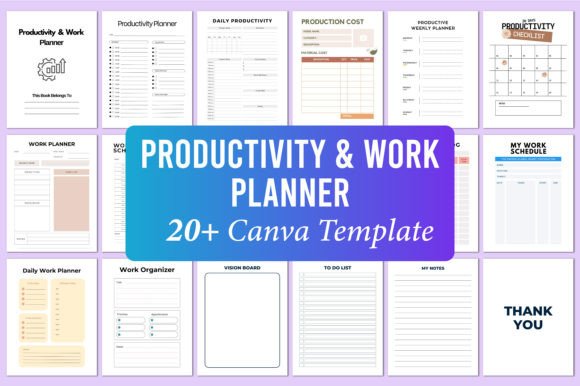
This package delivers a comprehensive set of planning resources built around 20 editable Canva templates. Each template is designed to address a distinct aspect of productivity, from daily scheduling to long-term vision setting. The complete set covers:
- Daily Productivity and Daily Work Planner pages
- Weekly Planner and Work Schedule layouts
- 20 Days Productivity Checklist, plus 25-day and 30-day Productivity Challenge sheets
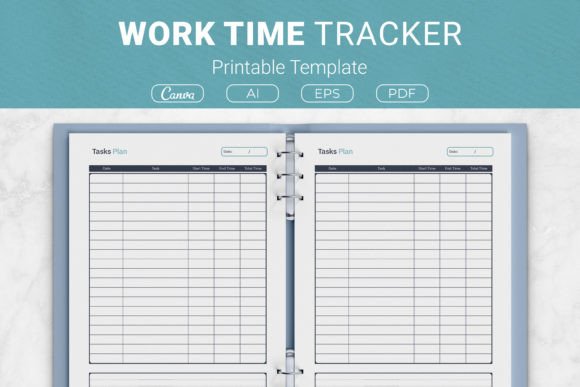
- Production Cost Work Planner and Work Time Log
- My Work Schedule and Work Organizer sections
- Work Plan Schedule and Vision Board
- To Do List, Notes pages, and a Belongs To page
The inclusion of both a 20-day checklist and two challenge durations (25 and 30 days) allows users to choose the commitment level that matches their current habit-building stage. The Vision Board page adds a strategic layer, connecting daily tasks to broader objectives.
Format and File Specifications
The planner is delivered in multiple formats to accommodate different use cases. You receive a high-quality print-ready PDF file, a JPG file, and a PNG file. The editable Canva link is the core feature, enabling full customization of colors, fonts, layout elements, and text. Key specifications include:
- Page size: 8.5 x 11 inches (standard US letter)
- Resolution: 300 DPI
- Color profile: CMYK
- No bleed (suitable for standard printing or digital use)
- 20 editable Canva templates
- 100% original design
The 300 DPI and CMYK settings ensure that printed output maintains sharp text and consistent color reproduction. The no-bleed specification simplifies home or office printing, as no trimming is required.
Practical Strengths of the Design
The Editable Productivity Work Planner stands out for its modular structure. Instead of a single rigid layout, you have multiple specialized pages that can be combined or used independently. This matters because productivity needs vary by profession, project phase, and personal preference.
The Daily Work Planner pages are suited for detailed hourly scheduling, while the Weekly Planner offers a broader view. The Production Cost Work Planner is particularly useful for freelancers and small business owners who track expenses alongside time. The Work Time Log provides a straightforward way to audit how hours are actually spent, which is essential for accurate billing or self-assessment.
The inclusion of challenge sheets (20, 25, and 30 days) supports habit formation research. Behavioral science suggests that shorter commitments (around 20 days) can be effective for simple habits, while more complex routines benefit from longer tracking periods. Having all three options lets users experiment with what works best for them.
Usability and Customization Flexibility
Because the templates are delivered through Canva, customization requires no specialized software—just a free Canva account. You can adjust colors to match a brand palette, change heading fonts, resize elements, or add your own graphics. This makes the planner suitable for personal use and also for professionals who want to present a cohesive brand image to clients or team members.
The editable link preserves the original design structure, so you cannot accidentally break the layout. Canva’s drag-and-drop interface allows for quick modifications, and you can duplicate pages to create additional spreads. For those who prefer analog use, the PDF and JPG files can be printed directly after editing.
Real-World Application Examples
Consider a freelance graphic designer managing multiple client projects. The Work Schedule and Work Time Log pages help track billable hours per project. The Productivity Challenge sheets can be used to build a daily file-organization habit over 20 days. The Vision Board keeps long-term goals like “launch a portfolio site” visible alongside daily deadlines.
For a small business owner, the Production Cost Work Planner helps estimate and track expenses for each product or service. The Weekly Planner aligns team tasks with the Work Organizer pages, reducing overlap and missed deadlines. The To Do List pages can be printed weekly and shared during team check-ins.
An educator or blogger could use the 30-day Productivity Challenge to develop a consistent content creation routine. The Notes and My Notes pages provide space for reflections, while the Thank You page adds a professional touch when sharing printed planners with collaborators or clients.
Who Benefits Most from This Planner
This planner is best suited for users who need structure but also value flexibility. It is not a fixed journal with pre-filled dates, so it works for anyone who wants to start using it immediately without waiting for a new month or year. Entrepreneurs, freelancers, marketers, creators, and serious hobbyists will find the layout variety practical.
Professionals working in hybrid or remote settings can use the digital files on tablets or in annotation apps like GoodNotes or Notability. The PNG files are especially useful for digital planning, as they import cleanly into note-taking apps. For those who prefer paper, the PDF prints clearly on standard office paper or heavier cardstock.
Teams or small groups may also benefit. A manager could customize the Work Schedule and Work Organizer pages for a specific project and distribute printed copies. The consistent design ensures that all team members use the same visual system, reducing miscommunication.
Quality and Consistency Considerations
The 100% original design means the layout is not a generic template. The spacing, typography, and section headers appear intentional rather than crowded. At 8.5 x 11 inches, each page has enough room for detailed notes without feeling cramped. The lack of bleed simplifies printing, but users accustomed to full-bleed designs may notice the white margins.
The editable Canva link is likely to remain accessible as long as Canva supports shared templates. However, users should download their edited files as PDF or PNG backups, since online-only access carries some risk if the original template is ever modified or removed by the creator.
Color reproduction will vary by printer. While the CMYK profile is optimized for commercial printing, home inkjet printers produce acceptable results when using high-quality paper. For professional presentations, printing at a local copy shop is recommended.
Possible Limitations
Users who prefer a completely predated or bound planner may need to print and bind the pages themselves. The no-bleed format is standard, but some may prefer a full-bleed design for a more polished book-like appearance. Additionally, the templates are designed in US letter size, so users outside North America should confirm compatibility with A4 paper or adjust the print settings.
The challenge sheets focus on consecutive-day tracking, which works well for daily habits but may not suit tasks performed on non-consecutive days. Users with irregular schedules can adapt by printing multiple copies or using the pages cyclically.
For those who prefer minimalistic layouts, the design has clear headers and defined sections but is not sparse. Some users may choose to simplify by removing certain graphic elements in Canva.
Long-Term Value and Adaptability
The Editable Productivity Work Planner can be reused indefinitely. Because the templates are editable, you can reset dates, change challenge titles, or create entirely new page variations from the original structure. This reduces the need to purchase new planners each year, making it a cost-effective option for ongoing use.
The Vision Board and Work Plan Schedule pages encourage regular recalibration of goals. Over time, users can refine their planning system by keeping only the pages that prove most useful. The flexibility to print only selected pages prevents waste and keeps the system lean.
For creators and educators who produce content for others, the editable link also serves as a base for creating derivative planners for students, clients, or subscribers. Custom branding and minor layout adjustments can be made before sharing, adding value to your own offerings.
Final Considerations for Choosing This Planner
When evaluating whether the Editable Productivity Work Planner fits your workflow, consider your planning habits first. If you benefit from having multiple distinct pages for different tasks—scheduling, time tracking, cost management, habit tracking, and goal setting—this structure aligns well. It does not force you into a single method, which is valuable for those whose responsibilities vary day to day.
If you frequently experiment with different planning systems, the editable format allows you to adapt without starting from scratch. The combination of daily, weekly, and challenge-based layouts gives you room to test what leads to consistent progress. The quality specifications support both professional printing and everyday home use, and the original design avoids the generic look of many free templates.
Ultimately, the value of any planner depends on how consistently you engage with it. This set provides a well-rounded foundation for building that engagement, with enough flexibility to evolve as your needs change.