My Delicious Recipes KDP Interior: The Complete Guide to Building Your Cookbook Publishing Business
The world of self-publishing on Amazon Kindle Direct Publishing (KDP) has opened doors for countless creators looking to share their passion and build a sustainable online business. Among the most resilient and beloved niches on the platform is the humble cookbook. However, while everyone loves a good recipe, not everyone has the graphic design skills, software knowledge, or sheer time required to format a professional, print-ready interior from scratch. This is where a specialized asset like the My Delicious Recipes KDP Interior becomes an indispensable tool. Whether you are a seasoned KDP veteran or a complete beginner, understanding how to properly leverage such an interior is key to streamlining your workflow, avoiding costly mistakes, and scaling your publishing business.
This article will provide a comprehensive, ground-up explanation of what this interior package is, how to use the included files (AI, EPS, PDF, JPG, SVG), the technical specifications you need to know, and the crucial steps you must take to ensure your book passes Amazon's quality checks. If you are looking to create a high-quality, 8" x 10" recipe book without the headache of starting from a blank document, this guide is for you.
What is a KDP Interior and Why Does It Matter for Cookbooks?
Before diving into the specifics of the product, it is essential to understand what a "KDP Interior" actually is. A book is comprised of two main elements: the cover and the interior. The interior includes every page inside the book—the title page, table of contents, and, most importantly, the actual content pages (your recipes).
For a cookbook, the interior layout is paramount. Readers need to quickly scan ingredients, understand step-by-step instructions, and feel inspired by the presentation. A poorly formatted interior with cramped text, inconsistent fonts, or awkward spacing leads to a frustrating user experience, negative reviews, and potential returns. Amazon values customer experience more than almost anything else, so a professional interior directly impacts your book's success and your account's health.
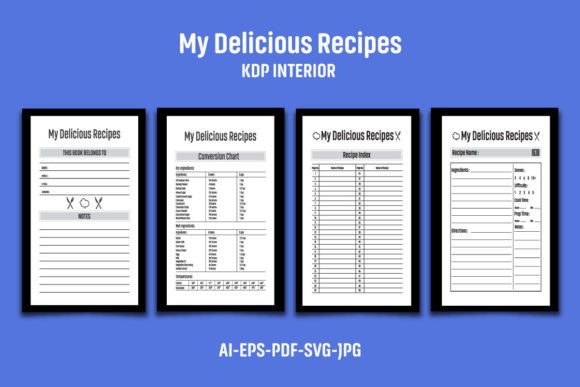
The My Delicious Recipes KDP Interior is a pre-designed template that solves this problem. It provides a structured, aesthetically pleasing, and technically accurate framework for your recipes. Instead of spending hours adjusting margins, setting up bleed, and designing layout pages, you can focus on what matters most: writing delicious recipes, developing your brand, and marketing your book. This is the foundation for building a KDP publishing business easier and faster.
Inside the Package: File Types and Technical Specifications
Understanding the components of your KDP interior package is the first step toward successful customization. The My Delicious Recipes interior comes bundled with a variety of file formats to suit different skill levels and software applications.
File Components (What You Get)
- 1 AI File (Adobe Illustrator): This is the primary source file. It is fully editable, allowing you to change colors, fonts, and layouts easily if you have Adobe Illustrator. This file is in CS6 version format, ensuring compatibility with both older and newer versions of the software.
- 1 EPS File (Encapsulated PostScript): An industry-standard vector format. This is an excellent alternative for users who may not have the latest version of Illustrator but have access to other vector editing software (like CorelDRAW or Affinity Designer).
- 1 PDF File (Portable Document Format): This is a ready-to-view file. You can use this to see the exact layout of the 110 pages. It also serves as a quick way to print a proof for yourself. Some users even use this PDF as a guide to manually recreate the layout in other software like Microsoft Word or Canva.
- 5 JPG Files (Joint Photographic Experts Group): These are high-resolution raster images of the interior pages. While not editable in the traditional sense, these are perfect for creating previews for your book's "Look Inside" feature on Amazon or for promotional materials on social media.
- 1 SVG File (Scalable Vector Graphics): A lightweight vector format that is widely supported by web browsers and many modern graphic design tools, including Canva Pro. This allows for easy scaling without loss of quality.
Critical Technical Dimensions
- Size: 8" x 10" Inch (With Bleed). This is a popular, spacious trim size for cookbooks, providing ample room for ingredients lists and instructions without feeling too large or clunky.
- Bleed Dimensions: 8.12 x 10.25 Inch. "Bleed" refers to the extra space around the edges of your document that gets trimmed off during printing. If you want any element (like a background color or image) to reach the very edge of the page, you must extend it into the bleed area. This interior is set up correctly with a 0.125-inch bleed on all sides. Always use the 8.12 x 10.25 dimensions when uploading the manuscript PDF to KDP.
- Pages: 110 Pages. A substantial number of pages that allows for a significant collection of recipes, a dedicated table of contents, and an index.
- Resolution: 300 DPI (Dots Per Inch). This is the industry standard for high-quality print. Text will be sharp, crisp, and easy to read.
- Color: Black and White. This interior is formatted for black-and-white printing. This significantly reduces the cost of printing, allowing for higher profit margins on KDP.
How to Use This Interior to Build Your KDP Business
Simply downloading the files is not enough. The true value comes from proper customization and deployment. Here is a step-by-step workflow designed to help you get the most out of this product while adhering to Amazon's strict guidelines.
Step 1: Extraction and Organization
The files come compressed in a single ZIP file. To access them, you need to use extraction software like WinZip, WinRAR, 7-Zip (free), or simply double-click and extract them on a Mac. Create a dedicated folder for your project to keep all assets organized.
Step 2: Choose Your Editing Software
Beginners may find the JPGs useful for reference, but for true customization, you must use the AI or EPS files. If you own Adobe Illustrator, open the AI file. If you are using a different program, try the EPS file. The SVG file is a great alternative for simpler editing in browser-based tools.
Step 3: The Golden Rule – Branding to Avoid Duplicate Content Flags
This is the most critical part of the entire process. Amazon KDP has a strict policy regarding duplicate content. If you upload an interior that is identical to thousands of other books on the platform, your book will likely be flagged, suppressed, or your account could be permanently banned.
The product description clearly states: "You need to create your own interiors to upload on Amazon KDP. Please add your logo or graphic to the Interior page before uploading to KDP to prevent any flags for duplicate content."
What does this mean in practice?
- Add Your Logo: Place a unique logo on the title page and at least one other location (like the bottom of each page or the "About the Author" page).
- Customize the Layout: Slightly modify the font style, the text size, or the placement of headers if you are comfortable doing so.
- Add Unique Content: The interior is just a container. Your actual recipes, introduction, health tips, and personal stories are what make the book unique. But the container itself needs to be personalized, too.
Failing to add your own branding and logos is the number one mistake new publishers make. It jeopardizes your entire business. Treat the interior as a high-quality skeleton that you must give a unique identity.
Step 4: Populating Your Recipes
With your brand safely integrated, you can begin filling the 110 pages. The interior is designed for a smooth workflow. Simply duplicate the master recipe page layout for each new recipe. Ensure your text stays within the safe margins (inside the red or blue guides in Illustrator) and does not bleed into the trim area. Since the interior is black and white, focus on the clarity and readability of your instructions. You do not need to worry about color images, which saves both time and printing costs.
Step 5: Exporting for KDP Print
Once your content is finalized, you need to export your file as a PDF.
- Preserve Editing Capabilities: Do not just "Save As" a PDF. Use the "File > Export" or "Save As Adobe PDF" function. Ensure you are using the "High Quality Print" setting or the "PDF/X-1a:2001" standard.
- Embed Fonts: Make sure all fonts are embedded in the PDF. This prevents Amazon's printing system from substituting your chosen font with an ugly default.
- Check Your Bleed: Confirm that the PDF page size matches your bleed setting (8.12 x 10.25 inches).
Understanding the 8" x 10" Trim Size Advantage
Choosing the right trim size is a strategic business decision. The 8" x 10" format is specifically well-suited for cookbooks for several reasons:
- Readability: It offers a generous text area, allowing for larger font sizes which are easier to read while standing in the kitchen.
- Professional Standard: It feels substantial and professional in hand, similar to traditional published cookbooks, which builds trust with your customers.
- Content Density: It can comfortably hold a standard recipe structure (ingredients list on the left, instructions on the right, or a single column of both) without feeling cramped.
Common Mistakes to Avoid
To ensure your journey is smooth, keep these common pitfalls in mind:
- Ignoring the Bleed Warning: Uploading a PDF with an 8" x 10" page size (without bleed) when the file is designed for 8.12" x 10.25" will result in incorrect scaling or rejection by Amazon's system.
- Using Low-Resolution Images: Even though the interior is black and white, any graphics you add must be at least 300 DPI. Blurry or pixelated images scream "unprofessional."
- Forgetting to Outline Fonts (or Embed Them): If you use a specific font and do not embed it, Amazon's printers may replace it, completely ruining your layout.
- Treating it as a "Done-for-You" Product: This interior is a tool, not a finished book. You must invest the effort to make it your own. The mockups and sample images in the product listing are for demonstration only and are not included.
Conclusion: Streamlining Your Path to Publication
The My Delicious Recipes KDP Interior is more than just a set of files; it is a strategic asset for anyone serious about building a publishing business in the cookbook niche. By providing a technically sound, print-ready framework, it eliminates the steep learning curve of book formatting, allowing you to channel your energy into crafting great content and building your brand.
Success on KDP depends on a combination of great content, professional presentation, and strict adherence to rules. This interior handles the presentation aspect beautifully. By following the guidelines outlined in this article—specifically the critical requirement to add your own unique branding and logos—you can confidently use this tool to create a product that stands out in the Amazon catalog, satisfies customers, and generates income for your business. Download your files, extract them, open your preferred editing software, and start building your delicious recipe book today.