Flight Information KDP Interior: The Complete Guide to Creating a Professional Flight Logbook
Whether you are a seasoned pilot, an aviation student, or a self-publishing author looking to branch into niche journals, having a polished, ready-to-upload interior is essential. The Flight Information KDP Interior is a specialized template designed for Amazon's Kindle Direct Publishing platform. It lets you create a high-quality flight logbook or aviation journal without hiring a designer or wrestling with layout software. This guide explores the template's features, why it matters, and how you can use it to produce a professional publication that resonates with aviation enthusiasts.
What Is a Flight Information KDP Interior?
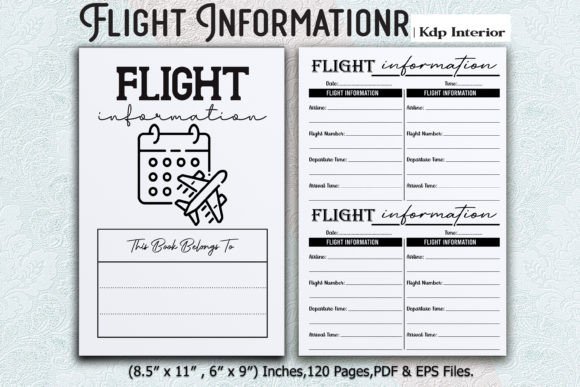
A KDP interior is the inner content of a book—the pages, formatting, and layout—that you upload when publishing through Amazon. The Flight Information KDP Interior is a pre-designed template tailored specifically for recording flight data. It includes structured pages for logging flight hours, destinations, aircraft details, weather conditions, and more. The template comes as a print-ready PDF and EPS files, so you can either upload it directly or customize it further in design software.
Think of it as a blank canvas, but one that already has the lines, tables, and spaces you need. You simply fill in the content (or leave it blank for users to write in), and the template handles the professional look. This saves hours of manual formatting and ensures your book meets Amazon's technical requirements.
Why Flight Logbooks Remain Essential in Modern Aviation
Even in an age of digital apps and electronic flight bags, the physical flight logbook endures. Pilots, student pilots, and aviation hobbyists rely on paper logbooks for several reasons:
- Regulatory compliance – Many aviation authorities require a physical logbook for license applications, currency checks, and audits.
- Personal record – A logbook is a treasured archive of every flight, from your first solo to cross-country adventures.
- Job applications – Airlines and charter companies often request a logbook review during hiring.
- No battery needed – Paper never crashes, runs out of power, or gets deleted by accident.
A well-designed flight logbook interior makes recording easy and consistent. The Flight Information KDP Interior addresses these needs by offering clear, organized fields that mirror standard aviation logging conventions.
Product Features That Make This Interior Stand Out
Let's break down the key specifications and what they mean for you as a publisher or user.
Multiple Dimensions: 8.5″ x 11″ and 6″ x 9″
Two popular trim sizes are included. The larger 8.5″ x 11″ (US Letter) provides plenty of space for detailed entries, making it ideal for flight schools or professional pilots who log many parameters. The 6″ x 9″ size is more portable, fitting easily into a flight bag. Both are standard KDP sizes, so you won't encounter upload issues.
120 Pages
At 120 pages, this interior offers enough room for hundreds of flight entries. That's roughly one to two years of logging for a recreational pilot or several months for a busy instructor. The page count keeps the book slim enough to print affordably while still feeling substantial.
300 PPI Quality with Bleed
The template is built at 300 PPI (pixels per inch), the industry standard for professional print. This means sharp text, crisp lines, and clean tables. The inclusion of bleed is critical: it extends the design slightly beyond the final trim edge, preventing white margins after cutting. Amazon requires bleed for books with edge-to-edge content, and this interior is fully compliant.
Print-Ready PDF and EPS Files
You receive two file types. The PDF is ready to upload directly to KDP—no modification needed. The EPS (Encapsulated PostScript) file is vector-based, allowing you to open it in software like Adobe Illustrator or Inkscape. If you want to add your own branding, change colors, or rearrange fields, the EPS gives you that flexibility.
ZIP Compression for Easy Access
All files are bundled in a single ZIP folder. After download, extract the contents to reveal the PDF and EPS files. This keeps everything organized and ensures you don't lose track of versions.
How to Use the Flight Information KDP Interior for Self-Publishing
If you are new to KDP, the process may seem daunting. But with a ready-made interior, it becomes straightforward. Here is a step-by-step approach:
- Purchase and download the ZIP file from your chosen marketplace.
- Extract the files using built-in OS tools or free software like 7-Zip.
- Choose your size: decide between 8.5″ x 11″ and 6″ x 9″. Open only the folder for your preferred size.
- Optional customization: if you want to add a title page, logo, or instructions, open the EPS file in a vector editor. Make your edits, then export as PDF.
- Upload to KDP: log in to KDP, create a new book, and in the "Paperback Content" section, upload your PDF interior. Set the trim size to match the template.
- Preview: use KDP's preview tool to check that everything aligns. Because the interior has bleed, ensure your cover extends to the full size.
- Publish: after setting your price, description, and categories, submit for review. Amazon typically approves within 24–48 hours.
The beauty of using a pre-made interior is that you skip the trial-and-error phase. The margins, gutter, and bleeds are already calculated for KDP's printing standards.
Who Benefits from This Interior?
This template serves multiple audiences, each with distinct needs.
Aspiring Self-Publishers
If you want to enter the lucrative niche of aviation journals, logbooks, or pilot diaries, this interior gives you a professional foundation. You don't need graphic design skills. Just add a compelling cover, write a helpful product description, and you have a product ready for sale.
Pilots and Flight Students
You may simply want a high-quality logbook for personal use. Buying a pre-formatted interior and printing it through KDP (or a local printer) can be more affordable than a branded logbook from an aviation store. You also have the option to customize fields to match your specific training requirements.
Flight Schools and Clubs
Flight schools often provide logbooks to students. With this interior, you can produce branded logbooks in bulk. Customize the EPS file with the school's logo, then upload to KDP for print-on-demand. There's no inventory risk—books are printed only when ordered.
Clarifying Common Misunderstandings
Some buyers wonder whether the interior is a "fillable" PDF or a "blank" one. The Flight Information KDP Interior is designed as a blank journal-style logbook. The fields are pre-labeled (e.g., "Date," "Aircraft Type," "Duration," "Remarks"), but they are empty on upload. You (or the end user) fill them in by hand after printing. This is standard for physical logbooks.
Another assumption is that "120 pages" means 120 log sheets. In fact, pages include title pages, instruction pages, and perhaps a pilot information section. The actual number of log-entry pages will be slightly less, typically around 110–115. That is still ample for most users.
Finally, some worry about the EPS file being difficult to use. However, even free software like Inkscape can open and edit EPS files. If you only need the PDF, you can ignore the EPS entirely. The template is designed to be accessible regardless of your technical skill level.
The Role of KDP Interiors in Modern Publishing
Self-publishing has democratized book creation. Authors can now produce niche titles that traditional publishers ignore. Flight logbooks are a perfect example—they have a dedicated audience but limited shelf space in bookstores. With a quality interior template, anyone can bring a logbook to market quickly and cost-effectively.
Moreover, the print-on-demand model means you never hold inventory. Every time a customer orders, Amazon prints and ships a fresh copy. This reduces waste and financial risk. The Flight Information KDP Interior is optimized for this model, with bleed and resolution that meet Amazon's strict print standards.
Tips for Maximizing the Template's Value
- Create a series: use the same interior layout but vary the cover design—e.g., "Pilot Logbook: Blue Edition," "Student Pilot Logbook," "Commercial Pilot Logbook." This builds a brand.
- Add a foreword: include a short page with logging tips or abbreviations. This adds perceived value and helps beginners.
- Combine with a matching cover: if you are not a designer, hire a cover designer on Fiverr or use Canva templates. A coherent look increases sales.
- Test print one copy: before publishing, order a proof. Check that the bleed is correct and that the binding doesn't cut into the margins.
Final Thoughts
The Flight Information KDP Interior is more than a file—it's a shortcut to a professional, market-ready product. Whether you are tracking your own flight hours or building a small publishing business, this template removes the technical barriers. With 120 pages, two sizes, high resolution, and both PDF and EPS formats, it offers flexibility and reliability.
Remember that successful publishing is about serving an audience. Aviation enthusiasts value accuracy, clarity, and tradition. By providing a well-structured logbook, you help them maintain their records with pride. And with a ready-to-upload interior, you can focus on what matters most: getting your book into the hands of readers who need it.
If you have found this guide helpful, consider exploring other niche interiors in the same style. The combination of a great cover and a flawless interior is the secret to standing out on Amazon. Appreciate the design, trust the process, and enjoy the journey of self-publishing.